Showing posts with label basics. Show all posts

Sunday, July 17, 2016

What is Content Provider

Today I will continue my "What is *Android component*" series and tell you about one of the essentials parts of an Android application a content provider.

Previous posts from this series:
What is Activity
What is Fragment

The problem

First of all, let's consider the problem that this component is meant to solve.

It's often useful for applications to retrieve data from other apps on the smartphone. Many pre-installed Android apps have the data that can improve the user experience of other apps. 

For example, phone book has information about the people that are probably your friends and it can be used by social networking app like LinkedIn to connect with someone you know in this social network.

User dictionary has information that can help users type faster by providing them with the most used words when they use a custom keyboard.

So, it would be convenient to have some tool that can share those kinds of data.

Something that would provide a consistent interface across all the apps on an Android device.

The solution

The solution came from the pair Content Provider and Content Resolver. These 2 Android components not only solve the problem but give much more benefits for an Android developer, but first things first.

Content Provider

What is great in Android SDK is that most of the components' names speak for itself.

Basically, all the Content Provider does is provide access to the content of some app.

There is a database in the core of a Content Provider and Content Provider adheres concepts of encapsulation and hides the structure of the underlying database and provides its' own methods to work with it.

To request data from a Content Provider you should know a Uri so that it knows what kind of data you want. Usually, in the implementation, a content provider uses UriMatcher to distinguish different types of queries.

For example, you can request all weather for particular location using something like this content:/com.weatherpp.app/mounain_view but when you need weather for particular date you may need to use another Uri, probably something like this content:/com.weatherpp.app/mounain_view/06/17/16 and Content Provider is meant to understand what you want using this Uri and give you this data. (By the way, com.weatherapp.app part is called content authority)

Content provider should implement an interface that allows to insert, update and delete data from the database. To be precise, all content providers extend the ContentProvider class but I don't want to go into implementation details to keep things abstract and easy to understand.

Content Resolver

Content Resolver is a thing that determines which content provider to query using the Uri you give to it.

How does resolver do this? It's pretty easy, to be fair. Remember the content authority? This com.weatherpp.app thing. Before using a content provider you should register it in the system through your app's manifest and provide its' authority. And using this authority Content Resolver can understand which provider you want to use, somewhat similar to how a content provider decides what piece of data you want to query.

It's worth to mention that unlike content provider you don't need to implement content resolver. It's already implemented and built-in in the system. You can get it using context.getContentResolver() in your application.  

When to use Content Provider

So in which situations you should use content provider?

As I said, content provider gives many benefits to developers besides sharing data between apps. So in my opinion answer is: anytime you're working with a database.

To explain my answer, let me tell you about the benefits.

Abstraction

The first, and I think the most important, benefit is an additional level of abstraction between the database and an object using data.

Abstraction, as I see it, is always a good thing because it allows you to think in terms of the problem domain and not think about small, tricky details of implementation.

Encapsulation

This thing kinda supports abstraction, without encapsulation abstract things are not abstract.

Encapsulation also saves you from thinking about structure and implementation of your database operations.

Scalability

This is an outcome of abstraction. First of all, you can be sure that if you have different layers of abstraction changes in low-level implementation won't affect high level. 

So when you add a table to a database or new column to a table you don't need to change all the code that uses this database/table you simply change you provider's code or don't change anything at all.

Flexibility

Actually, you're not required to expose all your data to other apps if you're using content providers.

So you can use it for your convenience and if you want to expose it you can do it by changing only one line in the manifest. You change it and voila you have your very own API.

Consistency

If you use content provider you have a consistent interface for all your data operations such as insert, delete, and query. And it's consistent not only inside your application but inside the whole platform.

And as Reto Meier said once
If you chose to not use content providers, well you chose poorly.

Sunday, July 3, 2016

What is Fragment

The concept of a fragment is tied very tight with the concept of an activity. And if you don't understand clearly what activity is I encourage you to read last week's post first and then return to fragments.

Also, here's the post that will help you to get a nice overview of basic Android classes such as Context, Activity, Fragment, Thread etc.

What is the problem

With the growth of popularity of Android system more and more developers started to pay attention to it. More and more apps were developed for Android and it entailed more and more complexity in these apps. In particular, this complexity was growing in activities and layouts.

Possible solutions

First of all, developers wanted something that would be reusable in several activities. And this, as I think, gave a birth to ActivityGroup. 

As the documentation says it's
A screen that contains and runs multiple embedded activities
which seems like a bit overhead. In this implementation, every activity has its' own context, while developers wanted something that would be a part of one single activity context.

And with the arrival of tablets, this problem became more obvious. And at that moment of time Google introduced the fragment concept. Intentionally, fragments were designed to meet exactly the needs of tablet layouts, but now there are a plethora of use-cases for fragments. 

So what is Fragment

Fragment represents a behavior or part of the user interface in an activity. Multiple fragments can be used in one activity to represent different parts of the activity. Also, one fragment can be used in different activities.

A fragment itself doesn't know about other fragments in the activity part of which it appears to be.
By definition, it's independent part of an activity and can do its' job even without other fragments. So if you fall into a situation when one of your fragments depends on another fragment you should think about the design of your application.

A fragment always should be embedded in an activity and the activity's lifecycle actually defines the fragment's lifecycle. If an activity is on pause then all of its' fragments are on pause. If an activity is destroyed then all of its' fragments are destroyed. If an activity is running not all (if at all) of its' fragments are running, though.

While activity is running, a developer can manually and independently control the fragment's lifecycle. For example, he/she can add new fragment, or delete old one or pause it. 

Also, while doing these transactions it's possible to add them in the backstack so the user can revert a transaction by pressing "back" button.

And it worth to mention that fragments operate on the same level of abstraction as activities.

There are two types of fragments: static and dynamic.

Static fragments

Generally, static fragments are fragments that will not be replaced by other fragments during the lifecycle of an activity. To add an instance of this fragment to your activity you can use the <fragment> tag in the XML file that represents your activity's layout. And that's it your fragment will work as if it would be an activity. Also, using this approach you will be able to find this fragment using its' android:id.

Dynamic fragments

I think that the name is self-explanatory. Yeah, right, dynamic fragments are the ones that could be added, deleted and replaced while corresponding activity is running. These fragments are added in ViewGroup programmatically using FragmentManager. To refer to this type of fragments during runtime you would use a special tag that should be unique for every fragment in the activity.

A couple of use cases

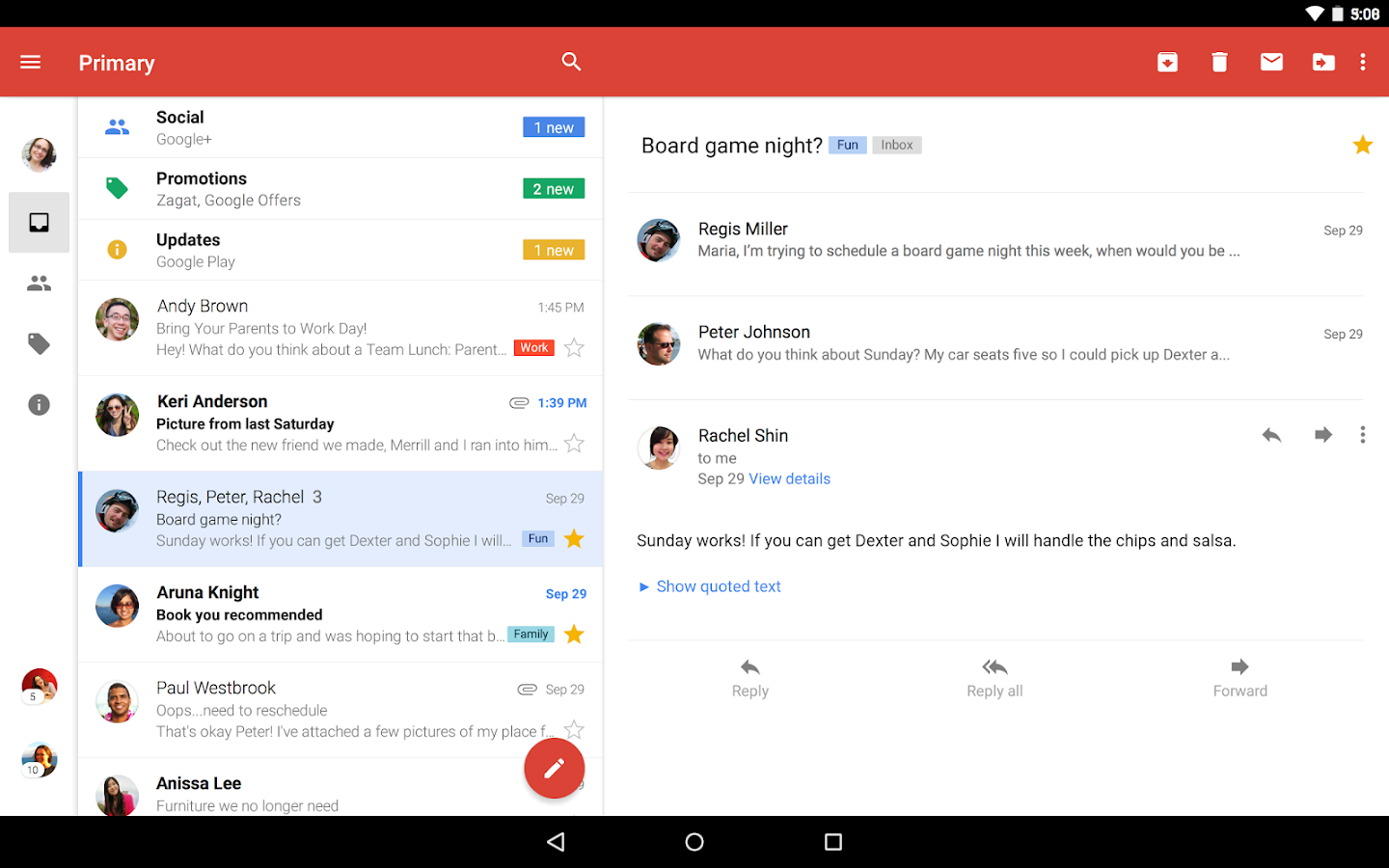
The most popular and easiest use-case for fragments is the implementation of master-detail flow on tablets.

Master-detail flow is the technique that used in many mobile apps. Generally, it's when you have a list of items that describe something briefly and the screen that shows details of this something. For example, in an email app, you don't see a full email right away you see the title, maybe some text but you should tap on it to see details.


Usually, on smartphones, there is no place for both, master and detail layouts and these are separate activities. But tablets are much much bigger than smartphones so it's more convenient to have everything on one screen. Like in this picture.


So in this case, fragments perform like both: part of an activity and reusable parts. You can use detail fragment in smartphone and tablet layouts, but in smartphone layout, it will have

Also, fragments can be used without layout as a separate thread of your activity, but when do so remember that the fragment's lifecycle depends on the activity's lifecycle.

Wrap up

Fragments are powerful, as said with great power comes great responsibility and, in software development, complexity. But you don't need to understand all this complex underlying basements of fragment to take advantage of them.

For me, fragments were something that only sophisticates the structure of an application. But it was because the lack of understanding. Now I understand what is fragment and think that it's elegant solution to the problem that arose with the growth of Android system. 

And I hope that I tackled this lack of understanding for you. If I didn't and you still have questions fell free to ask in comment section below!

That's all for today, see you in the next one!

P.S. If you want to bee up to date about posts on this blog follow me on Twitter.